
News on your Droid

I’m a news junkie. I love staying informed about what’s going on in the world and discussing current events with my friends and family. Android has a lot of options for keeping up to date – including USA Today, The New York Times and NPR News – the three of the biggest news outlets in the US.

With its clean interface and easy to navigate controls, USA Today is a good option for getting up to date with local, national and international news. You can also view sports scores, weather (if you’re not using another weather app) and pictures from the website. All of this is in blue and white format, much like their website.
My only complaint is that sometimes it is hard to scroll to the right to get access to more buttons. There is also no option for viewing USA Today in landscape.
This app also lacks some of the features of the other apps like sharing and cleaner/easier to navigate controls, but does include refreshing.
Download directly to your phone or install using AppBrain.com:
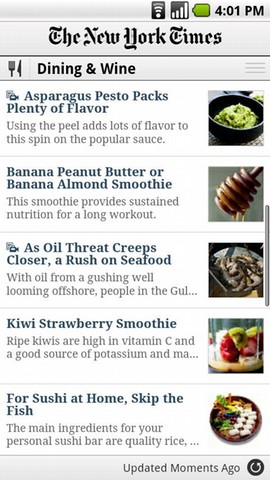 The New York Times, an American icon, also has an Android app that features most of its popular sections (Where’s the City Room blogs?) in an uncluttered format similar to its newspaper in black and white. While you can’t use this app in landscape, you can share article links across Android – email, tweet, share in other apps like Evernote – as long as the app is included in your sharing options, it’ll be there. This is great for times when you read a great article and want to share it with friends or the Twitterverse. You can access the share menu by clicking on Menu within the app.
A bonus of this app is that it automatically updates your news every time you log in. While I do wish for a manual refresh option, this is very helpful when I’m only halfway paying attention to my phone!
Download directly to your phone or install below directly to your AppBrain.com account:
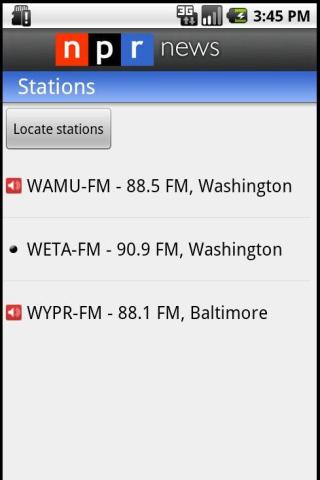
NPR News is probably the most full-featured out of all of the news apps discussed here, but it is not without some quirks. For example, when listening to an article, you can go back and read other articles – but it isn’t intuitive to click on the name of the audio playing and drag up to pause the broadcast. Even over less than 3G speeds, the playback is flawless. You can share articles with a designated button on the article (not in the menu like NY Times) and share audio, too.
Another great feature is the search for stations feature – search by call letters or by zip code and get streaming of your local or favorite NPR stations or podcasts. Too bad you can’t bookmark a page and come back to it later.
Download directly to your phone or use the link below to save to your AppBrain account:
How do you get your news on your Droid?



The Women With Droids Blog uses BlueHost for web hosting!

I share your passion and ‘need’ to be informed (or to know when I’m not). Great article!
Fox News just come out with an app, but I haven’t been able to use it as much as the others. I’ll do a post on it soon!
You may also want to check out the BBC news app. It has great “world news” headlines, plus it has all of the articles divided into “feeds” and you can pick the categories you want. I’ve just always been impressed with BBC news reporting and their app is simple, but has great content.