
App Review: OurGroceries

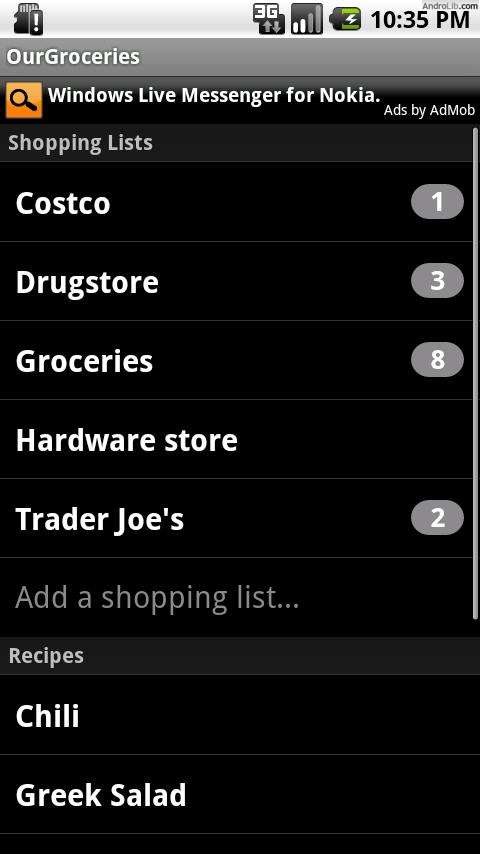 Shopping for a family is tough work, especially when everyone has different schedules and the same person doesn’t always do the shopping for the household. OurGroceries solves this problem by syncing your grocery list to your Android, Blackberry or iPhone – and web, too. Then, whomever is going grocery shopping will have the most up to date list in his or her hand without having to trek back home and look for a paper list.
The standout features are:
- Tap the “Add an item” line to add an item to the shopping list.
- Tap the “Add an item” line to add an item to the shopping list.
- Type in a new item name, or choose from a list of all the items you’ve entered in the past.
- Tap the arrow to the right of an item to change its name, delete it, or increase or decrease its quantity.
- While shopping, simply tap an item to cross it off the list and it will move to the bottom.
- Tap a crossed-off item to return it to the list. Crossed-off items are removed automatically after twenty minutes.
This app also lets you add recipes, so you can quickly look and see what you need to prepare special dishes. It comes pre-loaded with Greek Salad, so even the least experienced cook can learn how to make a simple, healthy dish.
You can also create new shopping lists – one for each store you frequent or for different weeks of the month. OurGroceries is not limited to just grocery shopping, but to any kind of shopping. So go ahead, add your drug store list or ideas for clothes you want to pick up the next time you’re at Old Navy!
This app is easy to use and makes shopping easy. While I think families will benefit from OurGroceries the most, single people like myself can also find a benefit in this app. No more trying to remember what you came to the store for and impulse buying!
Download from the Android Market



Cell Phones & Accessories on Amazon

Neat app, looks handy!
Do you have to specify the store for each item, or does it let you choose “any store”?
You can choose a basic list for any store, or make lists for specific stores.
You missed perhaps the best feature of this app. You can share your list with other family members with smartphones (Blackberry, iPhone, and Windows Mobile versions available, as well as a personalized web page for those without smartphones). Whenever anyone purchases an item on the list, it is crossed out within a few seconds on all the other users devices, or if you add something, all the other users see it. My wife and I use this all the time. If I am out shopping, and she remembers something we need, she adds it to the list, and I pick it up. No calls, no texts, just a shared list.
Hi Alan – thanks for your comment! Ellie did mention that everyone in the family will have the most updated version of the shared list, but thanks for clarifying and expanding on the feature! 🙂
Glad you like the app. It sounds really useful and I plan to try it soon, too!