
App Review: Bookmark Backup and Restore

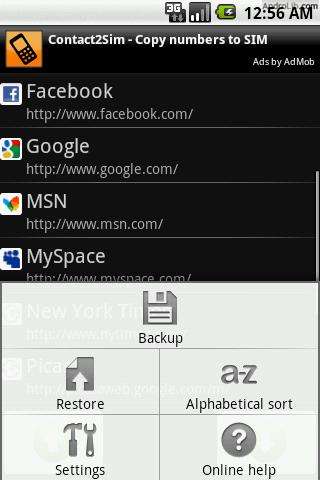 My biggest fear using Android is “What if I have to reset my phone and lose all of my bookmarks?” Well, Bookmark Backup and Restore solves this problem for you easily and makes it easier to view bookmarks through the default browser.
BBR saves your bookmarks to your SD card. You can also sort your bookmarks alphabetically, instead of in order by when you saved them to the browser.
Restoring is just as easy as backing up – just hit restore and watch the bookmarks get added back to your browser.
I don’t backup daily, but at least every week, so I can be sure I have the most up-to-date backup available.
Free in the Market, BBR is a quick download. One downside is that you can’t set the app to backup independently – you must manually set backup when you’re ready. But, if you value battery life, this is probably a good idea.
I give this useful app 4 out of 5 stars. Once they add automatic backups, this app will get 5 stars.
Download Bookmark Backup and Restore in the Market or add to AppBrain below:



The Women With Droids Blog uses BlueHost for web hosting!


Nice – simple & handy
If they add HTML backup so you can export to your computer’s web browser, this would be a great app!
I love it! I suppose you could put your phone into drive mode and copy over the backed up bookmarks from your SD card, but this is still massively useful! 🙂
Unfortunately because the backup is a .bak file, I don’t think you can use it on your computer other than to just copy it over and leave it in case of emergency. I wish you could save as HTML, and then you could import/export bookmarks between computer and Android phone!
Hello
Do you have any suggestions for backing up apps to the SD card?
Many thanks!!
App2SD lets you back up to your SD card but you must be rooted.
You can also use MyBackup or ASTRO if you aren’t rooted.
Thanks Ellie…I’ll be sure to check those out!