
App Review: AppBrain

 We’ve already told you about Listables!, a great way to share and save a list of your Android apps – but even more full featured is AppBrain, which is part website linked to the Market and part Android app that helps you search for Android apps online, make lists of the ones you want to add to your device and sync lists of apps between phone and web application.
Once you’ve logged in with your Google account, you’ll want to add AppBrain to your device using the QR Code below or searching for “AppBrain” in the Market from your phone.
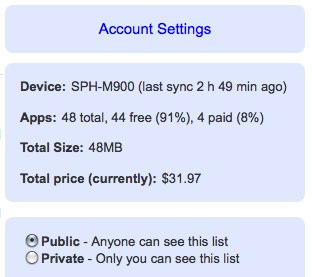
Then, you’ll sync your phone to the web application using the AppBrain app. Now, you’ll see some information about your device in an easy to read interface – what type of device you have, the percentage of paid to free apps, how much your apps are valued at and checkmarks indicating about whether you want to share your list with the world.
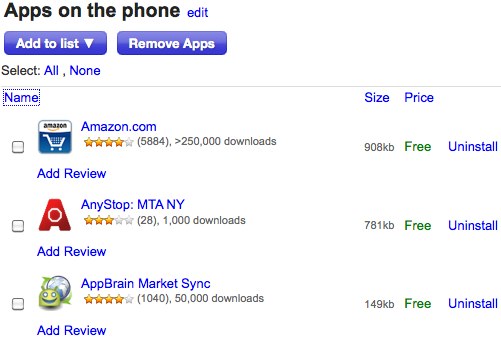
Your apps list can be sorted by name, size or price. Next to each listing is the option to uninstall, and on the next sync, you can automatically uninstall unwanted apps. You can also leave reviews for apps for other users of AppBrain to view when they visit the page of individual apps.
On individual app pages, you can view the same information you’d see in the Market, but on your computer’s screen. That’s really useful. The search feature also works great.
Curious about what other people install on their Android devices? Click on a name on an individual app page and you’ll be directed to their profile and a list of all of their apps. This adds a much needed social feature to buying or downloading apps.
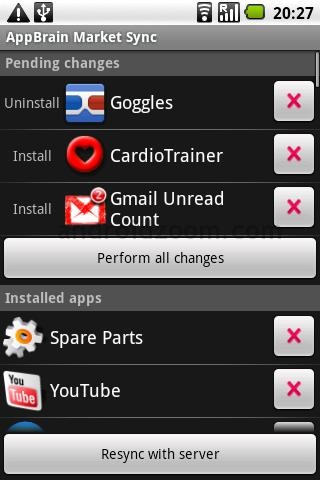
You can also manage your apps from your device. Below is a screenshot of what you’ll see on your device when you open AppBrain and navigate to “Manage my apps”.
Pass the time while you’re waiting at the doctor’s office or DMV by searching for new apps via the AppBrain app on your phone. The app provides recommended apps, categories of apps and links back to the Android Market.
Overall, this app gets 5 stars. It is easy to use, easy on the eyes and easy to set up. It’s a great app that makes managing your apps fun, sharing a piece of cake and finding new apps easier than ever.
Do you use AppBrain? What’s your favorite feature?




