

Not Using Google Voice Yet?

It has come to my attention that some people with Android phones aren’t yet using Google Voice! This really surprises me, because Google Voice is one of my favorite things about my Droid. If you haven’t made the switch yet because you’re used to your “regular” voicemail and haven’t felt the need to try visual voicemail, I strongly urge you to just try it out – you can always switch back if you don’t like it. However, once you can read your voicemails as text and view & play older voicemails with a click, I doubt you will feel the need to go back to the “old school” answering machine you’re currently using!
Letting people leave a message and quickly being able to see what they said comes in really handy. If you’re in a meeting and have your phone on vibrate, you can read the message that was left to see if it’s something urgent you need to excuse yourself to call back for. If you’re driving, you can let the phone ring to voicemail instead of talking while driving, then when you’re at a red light, see why the person was calling. If you have a relative that tends to talk for an hour and you’re busy, you can screen the call to see if they were just calling to chat or if they’re calling about something important enough to stop what you’re doing and return the call.
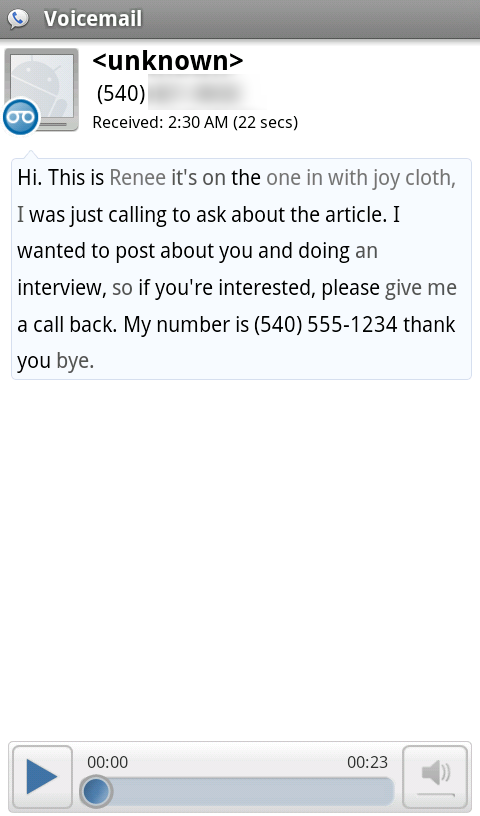
Google Voice message view (of me calling myself). The gray words in the voice transcription are the ones Google's not as sure about. "one in with joy cloth" should be "Women With Droids blog" 🙂
The voice-to-text transcription isn’t perfect, but it’s good enough to get the gist of what the person is calling for. And, if you can’t figure it out, you can just click the play button and listen to the original message. You can even set Google Voice up to play your messages through speakerphone by default so you don’t even have to lift the phone to your ear when you click play!
In order to get a Google Voice account, you may need to be invited. I think most people that have their phone set up with GMail accounts automatically access, but I’m not sure. It seems I got access without being explicitly invited. If you need an invite, try asking your friends and posting on Twitter – chances are someone you know has one (though they only gave each person 3). If you can’t find one anywhere, there are online forums where people post available invites – just Google it.
When you sign up, you can get a Google Voice phone number if you want one. You can give this number to people to call and have Google Voice determine where to route the incoming calls – it’s pretty neat and you can learn more about that feature here. However, I don’t use my Google Voice number (partly because it’s “local long distance” for people in my town to call), so I don’t have that functionality set up, but I do use the Google Voice app on my phone as my primary voicemail.
You can also view Google Voice voicemails on your computer, or my favorite: have it email you when a voicemail has been left! You have no idea how many times I have left my phone in my car and didn’t realize it until a Google Voice notification popped up in my email inbox.

So have I convinced you to try it? Ready to set it up now? There’s a good step-by-step tutorial with more info over at Android Central.
Do you use Google Voice? Do you find it indispensable? Or if you’ve never tried it, why not? Also, do you have invites you’re willing to share with Women With Droids readers? Let us know in the comments!




You may also request an invitation by giving your name and e-mail address in a form on the Google Voice site, but they seem to be very slow about processing those as I’ve never received on from that.
Thanks for the extra info, DW.
Here’s the link for anyone that wants to try:
https://services.google.com/fb/forms/googlevoiceinvite/
I have one Google Voice invite left. Feel free to contact me via my blog. First come, first served!
I use Google Voice when I don’t want to give out my personal cell #, but have to give people a contact number for myself.
I would love for someone to invite me, I e-mailed google about a month ago and am still waiting for my invite, I have the app downloaded but am unable to use since it is by “invite only”
hi Ms Ellie,
thanks for your kind posting. I’d love to receive the invite from you, here’s my email: hn.bahri@gmail.com (if it still available).
thanks and regards,
I wish I could use Google Voice, but it’s not available in my country.
Aw, I hope it becomes available internationally soon!
I sent the invite out!
Thanks for doing that, Ellie!
I would love to use Google Voice. Unfortunately, I live in Canada where it isn’t available yet. GV would save me about ten bucks a month (since I could get rid of my cell company’s VM).
Wow, they charge you extra for voicemail? I guess that could be good since you could ‘opt out’ – ours is probably just rolled into the base price of the plan!
Hope you can get Google Voice soon!
Update: Google Voice is open to everyone in the U.S. and Canada now, you don’t need an invite!
It figures; I finally received an invite three days before that.
[…] Google Voice […]
I just installed this app on my Droid 2 and it says it cannot verify my phone number. I have a gmail email address and account. I made a new one and it says the same thing about not being able to verify my phone number. Does anyone know what this could mean and how to fix it?
Thanks!
I’m not sure what that error means, but you likely need to sign up for a Google Voice account using your GMail address so they’re connected. See here:
https://www.google.com/voice
This is a good article to read from Lifehacker as a follow-up:
http://lifehacker.com/5697196/the-most-helpful-ways-to-use-google-voice-that-youre-not-using