
App Review: WWDiary

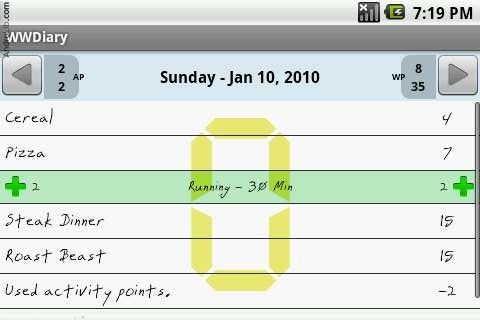
Ah, that good ole lifestyle change called Weight Watchers! It can be a dieter’s biggest joy or largest disappointment. With WWDiary, though, you’re more likely to fall into to the overjoyed category because of this great, free app for Android.
The interface is easy to understand – the first time you use the app, you’ll enter your weight and activity level, so WWDiary can determine how many points you should be eating per day. You also get Activity Points and Weekly Points – which make all the world of difference when you are exercising or want to splurge on pancakes.
You can easily go back in through the settings and adjust the points allowance, what day of the week your points reset and what points to use when you go over, because most of us are going to go over at some point. The point of Weight Watchers is not to deprive yourself, but to make smarter choices about the foods you eat.
The food entry screen has 3 notable features – a barcode scanner (which works most of the time for most things), a points calculator (does not do half points, yet) and selections for water, vegetables and dairy daily allowances.
Once you’ve saved a food, typing in the first few letters the next time you do food entry will bring up the points for that item. No more recalculating each time you have a hamburger!
The activity points calculator is also useful and follows Weight Watchers’ protocol. It’s nice to know that my long, sweaty walks at the gym are worth 8 points!
Overall, this app gets a 4 out of 5. Updates come often for this app and the developer is quick about answering support questions. The default font can be annoying, but that is easily changed under settings, too.
This app does exactly what it supposed to do – and does it well. Welcome additional features would be half points, more fonts and an exportable database.
Download this app today in the Market – and let me know what you think of it in the comments!




Hey thanks for reviewing my app! 😀
Thanks for making such an awesome app!
Like the app a lot! However, cannot figure out how to record water, dairy, veggies and oil! Tried everything I can think of and now I am wondering if it just does not work and has a bug? Have tried to download the user’s guide but the links don’t work for that either. I think I will really like this app a lot more once I get it set up!
Hi,
thanks so much for the app…I could use some instructions… how do you store a favorite food? How do you edit an entry once its in?
thanks again!
I love this app! I just don’t understand how it is calculating my daily points. The old way of calculating my points I would have 23 points but the calc is showing me that I get 29. Just wondering if this is because of the new program that was just launched.
I’m new to using droid phones and this app. Can you tell me how to remove a food once it has been entered?
Thanks!
a very useful app for taking care of my silhouette, my phone is helping me stay fit!
I would like to know how to input food. There is a box titled “points”, then a box for filling in calores, fat, fiber etc., then it says X 1. My question is – what am I supposed to put in the “points box”. I thought this would tell me what points a food is worth – but it looks like I have to know that beforehand. Help. 🙂