

WordPress To Go

Note: This is the photo I uploaded from my phone. It ended up being put at the top of the post, FYI!

This blog is built on WordPress so I downloaded an Android app called “wpToGo” just a few days ago so I could write drafts of articles from my phone when I was away from home, but hadn’t used it yet. It had decent ratings, and was the only app of its kind I could find.
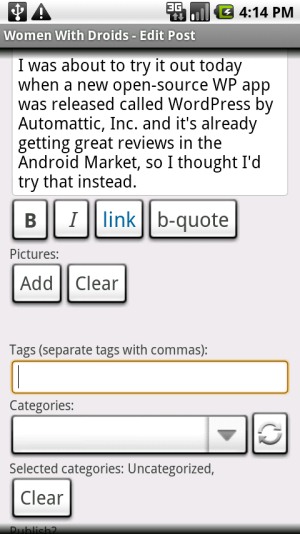
I was about to try it out today when a new open-source WP app was released called “WordPress by Automattic, Inc.” and it’s already getting great reviews in the Android Market, so I thought I’d try that instead.
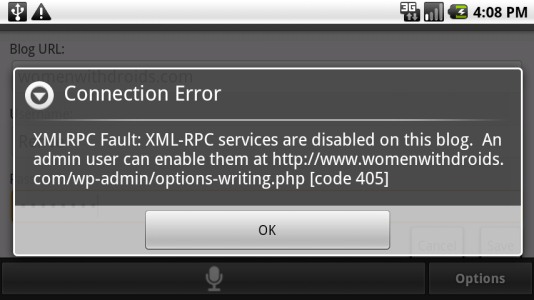
First, it gave me a warning that our blog wasn’t configured for me to be able to edit it by phone. The error message was helpful enough that I could make the changes needed without looking it up online – nice!
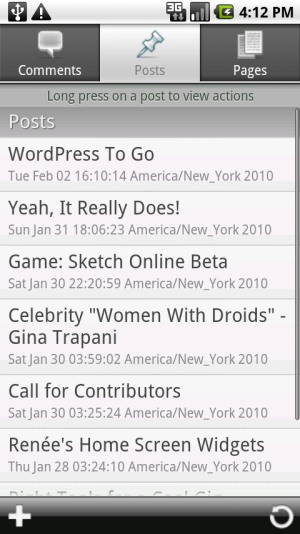
I just got this program a few minutes ago and it’s already set up, I can approve or unapprove comments, and I can edit posts and pages. It looks very easy.
 |
 Post Editing |
So, I’m going to open this post up in the Droid app and finish editing it from there… be right back…
…I’m back and on the Droid. The previously-entered images are showing in HTML. I can add a link here by long pressing then using the directional pad to select text, then pressing link and adding the URL.
Now I’ll try adding a picture from my phone’s gallery… It put the picture in thumbnail form below the post, so I don’t know where it’s going to show up until I publish this. Assuming it publishes successfully when I try to do so, I highly recommend this app to anyone that wants to write short articles, upload photos to their blog from the field, or just approve comments from a mobile interface.
Thanks for watching my experiment!




I’ve been using the Blogaway app on my Droid for a month now and use it to post daily to my DailyDroids.blogspot.com blog as well as to my personal family travel blog. Droid has really made blogging easy and I rarely ever use a PC anymore.
Good luck with your new blog, looks great!
Vicki – fellow MOTO Droid lover
Cool, thanks! And welcome!
[…] Testing… 2010 March 5 by syddiegrl Trying out the WordPress app on my Droid, per Renee’s write-up here! […]
[…] WordPress […]