

In Case of Emergency

My parents were good about drilling into my head that I should have safety equipment (flashlight, flares, etc.) in the car at all times, a first aid kit, and ‘Hot Hands‘ and a granola bar in the glove compartment in case I get stranded! I think I’m pretty prepared, especially considering I live in suburban Mid-Atlantic USA and not the extreme rural North. But all this snow and the recent earthquake in Haiti had me thinking – what could I put on my Droid that could help me in case of an emergency?
My mind first went to apps – I searched First Aid, Survival, Safety, and anything that looked useful for emergencies and came up with this selection which is now in a handy folder on my home screen:
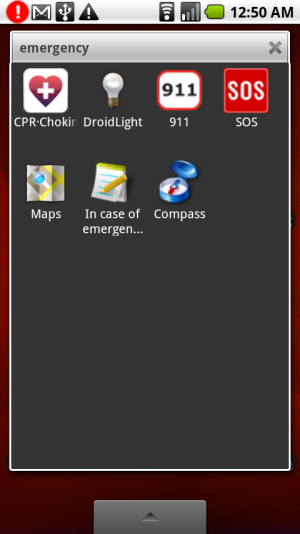
- CPR-Choking – Download this to have videos on your Droid which instruct you how to conduct mouth-to-mouth, CPR compressions, and the Heimlich maneuver on adults and children.
- DroidLight – This application switches on the Droid’s very bright LED camera flash and can be used as a flashlight. It’s very effective!
- 911 – This one is pretty obvious, it’s a quick-access 911 dialer button which pulls up your phone interface with 911 pre-dialed so all you have to do is click the call button. Yes, since I put it in a folder it only saves 2 clicks, but I don’t have to aim to dial numbers on the touchscreen keypad in a tough situation.
- SOS – SOS is a really simple app, but I think it’s one that is good to have. All it does is put a big colorful word on your screen, like “HELP”, or a custom phrase, and swiping up and down cycles through words while swiping left to right cycles through bright text colors. (see post thumbnail image)
- Compass – I know the map is a lot more useful than a compass, but if you can’t get a GPS signal, Google Maps can’t help you much. At least with a compass, if you’re lost in the woods you can make sure you aren’t going in circles.
Then I realized that an emergency could happen where I’m unconscious, but someone else may look through my phone for info. I wondered how I could add an “ICE” (In Case of Emergency) text file, and realized I had accidentally discovered a feature of another app earlier that would work. The OI Shopping List app allows you to create shortcuts to checklists on your home screen. So, I created a list with my name, allergies, medications, and emergency contact info, long-pressed on the desktop to open up the options to create a shortcut to the list, and moved it into my ’emergency’ folder. Like CraftLass wrote about, “Droid Does!”.
Honorable Mentions – these apps didn’t make it onto my phone, but got good ratings in the app store:
- Car Safety – This app claims to detect car accidents (I’m assuming by using the phone’s accelerometer) and sets off an alarm. If you don’t turn the alarm off in 60 seconds, it sends a text message with your GPS coordinates to a number you specify. However, it doesn’t work on the Motorola Droid in sleep mode, so until they fix that, I don’t think it will be very useful .
- Life360 Security Center – Life360 says it was named a “Top 10 Android App” by Google and it offers a lot of features: track your family on a map (if they also have GPS-enabled android devices), send & receive emergency alerts, and manage emergency profiles for each family member. It seemed like a little overkill for my needs, but if you have kids, it may be useful to have.
These apps are all free, but there are more could look into if you’re willing to pay to be prepared. One that caught my attention was called ‘Survival Manual’ for $1.99, which I haven’t tried out, but claims to be an entire Army survival guide you can store on your SD card.
Do you have any survival or emergency-related apps? Tell us about them in the comments!



Load up your phone with MP3s from Amazon!

There’s also an app called ICE…….lists top 2 ER #’s, blood type & allergies. It’s a big red cross so very easy for ER personnel to find if right on your homescreen.
Sounds useful – thanks for the additional info, Vicki!
This is a terrific article, I located your weblog searching aol for a similar subject matter and came to this. I couldnt discover to much alternative information on this blog, so it was good to locate this one. I will likely end up being returning to check out some other posts that you have another time.
Thanks, Rich! Glad you enjoyed the info 🙂