

On The Move? Pack your Apps!

Liz, a frequent traveler and fellow DROID-loving woman from Maryland, has written our blog’s first guest-post! Her article is the first in a series about utilizing your phone while traveling to make going out of town less hectic and more enjoyable. Keep an eye out for future posts in our WomanWithDroids Travel Series! ~Renee
- Luggage…Check.
- Plane Tickets…Check.
- Apps…Wait, what?
Spring is coming soon and we cannot wait to escape the cabin fever of our homes, especially when they are snow targets (link/image by NASA). Before you go racing out the door, don’t forget your most important item to pack full of goodies – your Droid! Don’t know what to install? Keep reading!
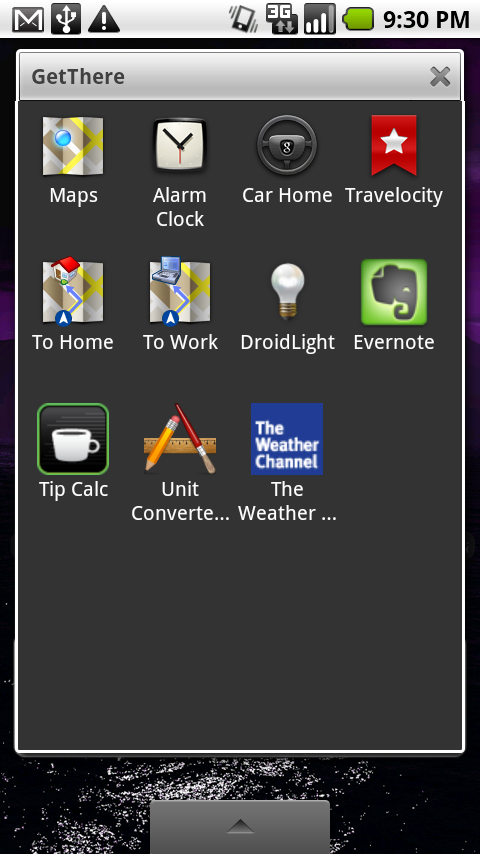
The screenshot above is my folder of apps I’ve categorized for Travel (or, in my labeling system, GetThere). If you haven’t yet set up your first folder, check out CraftLass‘ and Renee’s posts on setup and tweaking. I’ll wait, pop right back over when you’re done.
Alright, do you have your empty folder ready to add some apps? Good! Here are my top five recommended apps to add to your Travel folder:
5. Alarm Clock (Free)
Why? I’ve run the gamut of “morning rise” utilities. Wakeup calls, alarms, buzzers, people beating on my door, you name it, I’ve “snoozed” it. I have never been a “one alert” person when it comes to waking up, I need multiple noises from multiple sources. My current travel configuration is to set a travel alarm on a night stand for 10 minutes before my target “get out of bed” time, request a wakeup call for five minutes before, and then set my last alarm on my Droid with the same noise/ringer as my important calls on a dresser or a piece of furniture that requires me to get out of bed to turn off. By the time the phone goes off, my eyes are usually already open, but it never hurts to be careful.
4. Droid Light (Free)
Why? When I travel, especially for business, I pack lightly. I try to avoid weighing myself down with stuff I know I won’t use and don’t need for a short trip. Unfortunately, this also means when I’m packing away a lot of small items (3oz. bottles, anyone?), some things will inevitably follow the draw of gravity down to the bottom of my backpack. Then I end up delaying 25 other people in a TSA security checkpoint as I dig frantically through my bag for the sneaky little tub of lip gloss or hand lotion that I am terrified will get me pegged for having naughty intentions. Thanks, but no thanks. This little gem is simple – it turns on the built-in flash for your Droid camera to act as a flashlight, and trust me, that thing packs a brightness punch. Touch the lightbulb graphic on the screen when you’re done rescuing your miscellany from the depths of your bag, the keys from under your rental car, or your favorite stuffed animal from under the bed. Just please don’t point your phone at anyone while you’re running this, the light can hurt your eyes a LOT. I also don’t recommend turning it around to see just how bright it is. You can live without this experience, I promise.
3. Google Maps (Free)
Why? The Google Maps application works the same as the Google Maps web site we know and love, complete with driving, public transit, and walking directions. Just punch in your starting and ending addresses, choose your method, and hit “Go.” If you have your Locator and GPS services turned on, you don’t even need the starting address! You can even choose to jump to Navigation mode (Beta), which acts as a GPS.*
*Note: I do not recommend, or advocate, operating your Droid in this fashion while driving. If you absolutely, completely, and utterly can not hand the Droid over to a passenger to set up (or you don’t have a passenger), pull your car over, switch to Car Home (located in the All Applications list), set everything up, and then begin following the directions. Safety first!
2. Tip Calc (Free)
Why? I love this app, mostly because it is simplicity itself to use. At the bottom is a number pad that you use to input the total for your tab, then use the “+” and “-” buttons bracketing the “Tip %” value to adjust until you hit the tip rate you’d like to select. You can use the same toggles bracketing the left-hand “People” value to choose the number of people in your party, and the app will display what an equal split amount is based on the total with tip that it calculates. Favorite part? Use the buttons in the middle – “Round Total,” “Exact,” or “Round Tip” – to even out your numbers based on your preference. Personally, I always go with the “Round Total” setting.
1. The Weather Channel (Free)
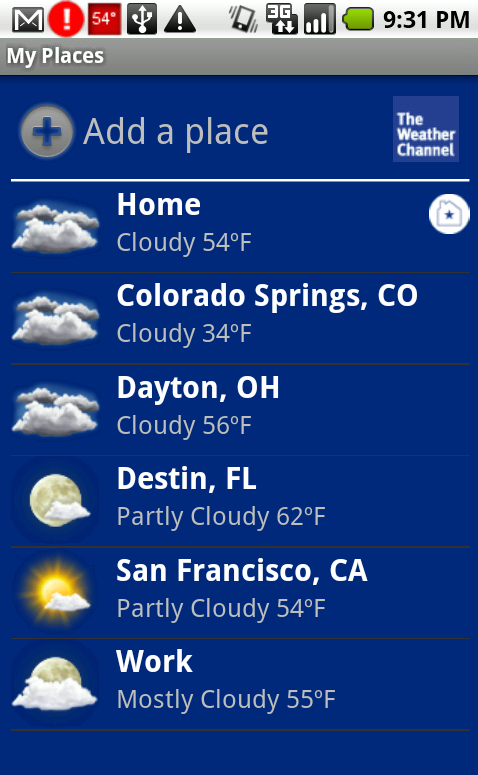
Why? I have been bounced all over the country recently – I still get giddy over the sheer oodles of Frequent Flyer miles I’ve racked up. As I’ve learned from recent experiences, the places I’m sent to can and do have extremely different weather conditions occurring at exactly the same time. There is a huge difference between seeing reports on the television as you’re curled up with a mug of tea, and having to pack for these unique and sometime harsh climates you’re about to be thrown into. The second I know my travel plans, I add the site address to the “My Places” section of The Weather Channel’s app (shown below) and switch to their 10 Day forecast. Adding it to my programmed “Places” means I can jump back and reference the weather at my destination at any time – this is particularly useful when you’re sitting, in limbo, in an airport trying to figure out how your flight got delayed two hours by the perfectly sunny weather beaming through the windows!
You may have noticed that all the apps referenced above are free. I’m not prejudiced against paid apps and there are some truly excellent ones out there. The apps I listed are the ones that I bounce back to, time and again, for great and small tasks, and are merely a small sampling of the flexibility the Droid provides when travelling. One app I didn’t mention above is the “911” app Renee mentions in her post on emergency-related apps. 911 is the “universal” emergency number in the United States per the NANP, and should always be accessible through your wireless device per FCC ruling in 2000. Also, I strongly urge you to read Renee’s post and set up something similar on your phone. I realize it may seem small or inconsequential, but any of the items she lists could end up being really helpful or possibly life-saving.
Have you found an app that you couldn’t live without while on travel? Please share in the comments!



The Women With Droids Blog uses BlueHost for web hosting!

Thanks for this detailed post, Liz. Lots of good tips.
I’m the same way about needing several alarms!
It’s true that the flash is really bright. I took a bunch of photos of my rabbit one day at close range, then one of myself and I felt so bad for subjecting him to the BRIGHT flash since that one shot made me see spots for several minutes! It makes for a good flashlight, though!
Great list. I use some of these on a daily basis!
excellent tips!
[…] WWD – We Rock! March 27, 2010 by syddiegrl So one thing that I definitely forgot to mention is that I wrote my first guest spot for the female technophile site, Women With Droids. Please check out the entire site, Renée has done a fabulous job with her partner in spreading the word of the Droid, the wonderful CraftLass. If you’re interested in reading my article, geared towards travelling with your droid, feel free – if all goes as planned, there will be a second travel write-up in the very near future! Check out part one of “On The Move!” […]
Great info…you guys rock!