
Guest-Post: App Review: CardioTrainer

App Type: Fitness
Price: Free; $9.99 for premium features
Get It: If you want lots of fun features and workout data, you’re exercising for less than two hours, and you don’t need an accurate read on your pace
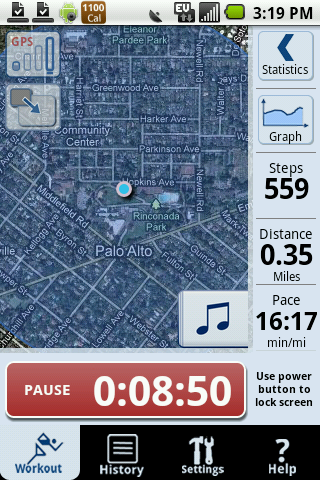 I love to run, and I’m addicted to information: How fast am I going? How far? How many miles have I logged this month? I rely on a GPS watch and an online training log, but when I heard about CardioTrainer, I wondered if this might be a better solution.
Feature-rich fitness app: CardioTrainer does just about everything I could ask for. It tracks time, distance, pace and elevation; gives voice notifications (key if you’re carrying your phone in an armband or a pocket); and integrates with a music playlist. It shows where you are on a map, and if you set a distance or time goal, it gives updates on how much of the workout you’ve completed. It will auto-pause when it senses you’re not moving.
For outdoor running, walking or cycling, CardioTrainer uses GPS to gauge distance; for a treadmill, it uses a pedometer. Other workouts can be input manually, or you can simply select your workout type and press Start as you begin moving. CardioTrainer tracks your time and calories burned.
If you’re a planner like I am, you can tell CardioTrainer when you intend to exercise and get an easy-to-use workout calendar and reminders. To track what you’ve done, you can view a simple history within the app or get a visual display through integration with Google Health.
CardioTrainer has some fun extras. You can choose to display “calorie medals” in your notification area, send your information to Facebook or Twitter, and set a New Year’s resolution. Premium features let you race against your own best time, set up a weight loss plan, or use interval training.
Ease of use: I was impressed with CardioTrainer’s elegance and simplicity. It’s easy to customize the basic settings,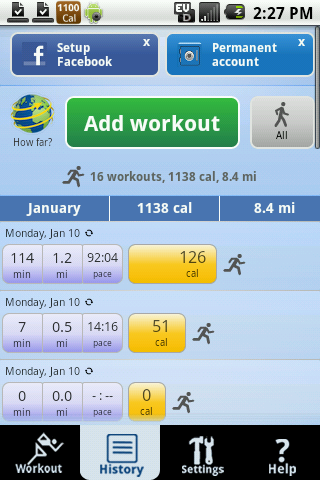 and once you’re set up, the interface is highly intuitive. It only takes a few seconds to get a workout started. Setting up workout calendars and goals is surprisingly quick and easy, and I loved how well the voice notifications integrated with my music player, which for me is a mandatory part of any workout. It worked well with Pandora, too.
Accuracy: Unfortunately, GPS accuracy seems to be CardioTrainer’s greatest weakness—and it’s an important one. I got some downright hilarious reads on my pace. While I ran at a slow but steady 12-minute pace, CardioTrainer’s pace reports ranged from a sub-6-minute mile to a 35-minute mile and back again. I tried adjusting the GPS settings for greater precision (which carries a greater risk of losing the signal), but it was still off by 1 to 2 minutes per mile. This also meant an inflated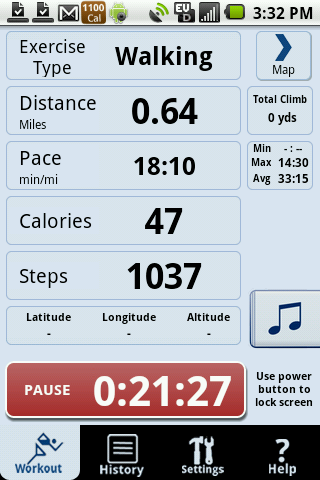 distance at the end of the workout. The company says it’s working to improve its GPS accuracy.
Improvements I’d like to see: I love CardioTrainer’s easy-to-use interface and plethora of features. But it has some shortcomings. In addition to the GPS issues, CardioTrainer wears down the phone’s battery too much for a long endurance workout. On my Samsung Moment, I estimate that it will last for about 2 hours when used with the phone’s built-in music player.
Also, I was looking forward to taking advantage of CardioTrainer’s integration with Google Health, which should make it possible to see graphs of my workout history, with automatic updates. However, I made three attempts to set up this feature, and each time, my phone froze and had to be rebooted. Too bad. Who doesn’t love a good graph?
I’ll keep using CardioTrainer for easy runs, when I’m not too concerned about knowing my pace, and when battery life isn’t an issue. But for faster training runs, as well as very long workouts, I’ll still be wearing my GPS watch so it can keep me on pace. And that means I’ll still be manually inputting my data into my online training log for now.
I hope CardioTrainer is able to improve its GPS accuracy. If it does that, it will become a fantastic app, and I’ll finally be able to stash my bulky watch in a drawer for good.
This is the 2nd in our series of guest-posts this month from ladies that would like to join on as WomenWithDroids regular contributors. If you are interested in becoming a one-time guest contributor or a regular contributor, please email renee at womenwithdroids.com.
Thank you for your entry, Sonya!
-Renee



