

Yeah, It Really Does!

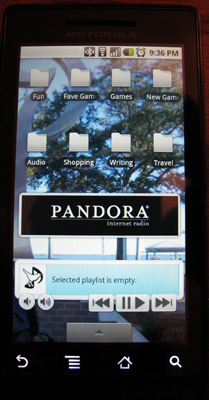
My right-side homescreen with folders and music players.
I bought my Droid on day one. I never had anyone to help me except for this awesome guy on Twitter who works for T-Mobile and has had several Android phones. It’s been quite an experience, and yet it can be summed up in just one sentence: Every time I think, “I wish I could do [insert an action]” it turns out that I can, I just hadn’t found that option or figured it out yet.
The best part? I’ve figured out almost all of it on my own. It’s intuitive enough to do that but not so obvious that you’d even notice until you need to do something.
Case in point: I was running out of room on my home screen and have so many apps now that scrolling through them all is a pain. Suddenly I remembered that you could put folders on the home screen, I’d just never done that or figured out how to name them. To add a folder, just long-press the screen anywhere you don’t have a widget or icon, select “Folders”, then “New folder”, and voila! You have a new empty folder that can hold anything but a widget or another folder. I quickly popped one on, opened it up, long-pressed the word “folder” at the top and the keyboard popped up. So simple, so obvious, yet I was gleeful to discover it!
Well, let me tell you, I just may have the world’s most organized Droid now. I would say most useful but probably only to me. I’m a musician, writer, entrepreneur, tech geek, space geek, gamer, and devoted girlfriend, which makes for a pretty weird collection of apps. That’s the point, though, right? Now I have folders for all my little obsessions and can fit lots of apps on my home screen without cluttering it up too much to have my widgets or most important apps. It almost feels like I have my life together.
If only I could do the same thing in my home…
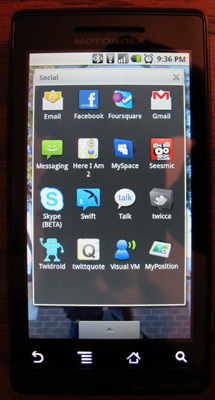
The "Social" folder on my homescreen.





I should take some pics of my screens…
I’ll try to post a screenshot tutorial soon!